October 20, 2026
Varo Cash Advance App: Bank-Backed Tiers and Fees
See how the Varo cash advance app really works, its exact fee tiers, and who qualifies before you link an account.
Read article


If your paycheck lands in Cash App instead of a traditional checking account, you're likely searching for cash advance apps that work with Cash App and getting inconsistent answers. You already know the frustration: you open a cash advance app, get to the "link your bank" step, and Cash App simply isn't on the list.
Here's the straight version. Most cash advance apps do not link directly to Cash App. One app, Tilt (formerly Empower), has its own help page confirming a way to link Cash App to a Tilt account, though it's a manual workaround rather than a "select Cash App from a list" option. Everyone else either explicitly excludes Cash App and similar prepaid or peer-to-peer accounts, or has no help-center page found confirming direct Cash App compatibility.
For most readers, the realistic path is a shared traditional bank account that's linked to both the advance app and Cash App. This piece walks through exactly where each major app stands, with the fee it charges for instant delivery where that's been verified, plus the workaround readers can use when direct linking isn't an option.
Say you need $80 by Friday and Cash App is the only account you check. Before you download anything, here's how four major apps stack up on Cash App compatibility, checked against each app's own support documentation, so you can rule out the apps that won't work before you spend time on a signup flow.
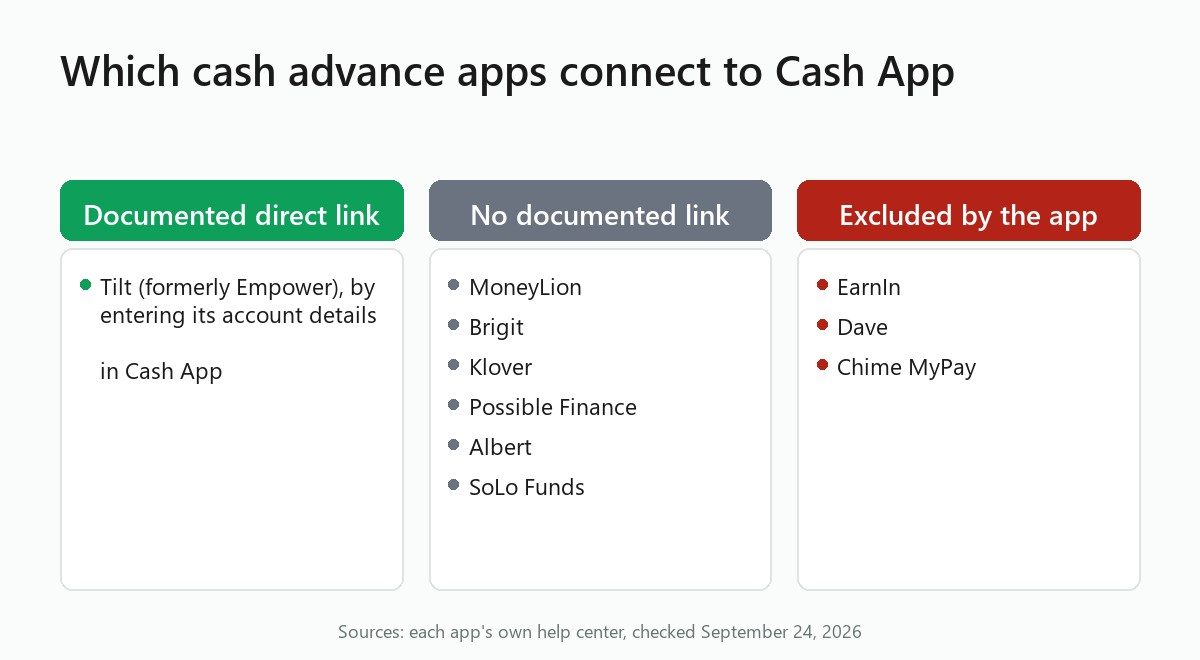
Tilt is the one name on that list with its own documentation behind the "direct" label, and even that comes with a real caveat, covered below. EarnIn, Dave, and Chime MyPay each have their own help page ruling Cash App out. A handful of other apps, MoneyLion and Brigit among them, don't confirm Cash App compatibility one way or the other; that group gets its own section further down rather than a spot in this list.
The mismatch is a plumbing problem. Cash App isn't a bank in the traditional sense. Its balances sit with Cash App's partner banks, and Cash App issues each user a routing and account number that behaves like a checking account for ACH transfers. That's enough to move money in and out, but it doesn't make Cash App a bank a cash advance app can simply select from a dropdown, which is the root of the confusion for anyone comparing these apps.
Most cash advance apps connect to your bank through Plaid, the account-verification service that powers the "search for your bank" screen you see during signup. Cash App generally isn't one of the traditional checking or savings accounts Plaid surfaces as a selectable option there. That gap alone explains why an app built entirely around Plaid has no obvious way to add Cash App as a destination, even if the company wanted to.
The three confirmed exclusions each layer their own reason on top of that gap. Chime MyPay's exclusion comes from its own deposit-source definition rather than Plaid, since a Cash App transfer simply doesn't meet what Chime counts as a qualifying deposit. EarnIn and Dave each publish their own funding-account requirements that rule Cash App out directly, separate from whatever role Plaid plays behind the scenes. Apps with no verified stance, MoneyLion and Brigit among them, have no help-center page found describing a manual-entry alternative either, which leaves their Cash App compatibility an open question rather than a documented no.
Manual account and routing number entry is the workaround that gets around Plaid's limits, and Tilt is the one app whose own help page documents that it works that way. Whether an app supports Cash App at all essentially comes down to whether it built that manual-entry option, rather than leaning on Plaid alone.
Tilt's own support article, "Connecting to mobile payment service apps," confirms that users can link Cash App to a Tilt account by entering Tilt's account and routing numbers inside Cash App, or by entering Tilt's debit card number there instead. That's according to Tilt's help center.
Read that carefully, because the wording matters. Tilt's help page covers linking Cash App or Venmo to a Tilt account by entering Tilt's account and routing numbers, or its debit card number, inside Cash App. It does not say where a Tilt advance itself is paid out. You go into Cash App and manually type in Tilt's numbers there, the same way you'd add any external account, but that mechanic and advance delivery are two separate things the help page doesn't tie together.
On fees, Tilt charges a small tiered instant fee that scales with the size of the advance, and that fee is waived entirely if you choose to receive the funds on Tilt's own debit card instead of routing them externally. Check Tilt's current fee terms before choosing an advance size, since fee tiers can change.
For readers weighing Tilt against similar apps generally, a sibling comparison on cheaper alternatives to Tilt covers that ground without repeating the Cash App-specific mechanics here.
Any app that pays an advance into a checking account also linked to Cash App can move the money over from there, and it's worth naming that plainly rather than dressing it up as compatibility, since the two aren't the same thing for a reader deciding which app to trust. If you have a traditional checking account linked to both your cash advance app and to Cash App itself, you can pull the advance into that checking account first, then transfer it into Cash App the way you'd move money from any bank. Klover describes exactly this pattern on its own blog: link a traditional bank account via Plaid, and if that same account is also connected to Cash App, the advance can move over once it lands.
The catch is timing. An instant transfer from the advance app to your bank account might cost an express fee, but moving money from that bank account into Cash App afterward is a second transfer with its own timing, and possibly its own delay, depending on your bank and Cash App's settings. A same-day need can turn into a next-day scramble if you're not accounting for both hops. This workaround applies to any app that requires a traditional linked bank account: MoneyLion, Brigit, Klover, and others in that category have no confirmed direct Cash App link, so this two-step routing is the realistic path if you want the money to end up there.
Three apps have documentation that settles the question outright, covered one at a time below.
EarnIn's list of unsupported banks states plainly that EarnIn does not work with savings or prepaid accounts, and names Cash App as an example. EarnIn needs a traditional linked checking account for both verifying your income and delivering the advance, so Cash App can't stand in for either step. For a full breakdown of EarnIn's limits and fees, see our EarnIn review.
Dave's ExtraCash product draws the same line. Dave's own external-account connection documentation lists Cash App among the services it won't accept when you're linking an external bank account, in the same category as PayPal, American Express, Discover, Credit Karma, and most prepaid cards. Dave separately publishes help content about sending money to other people through Cash App transfers, but that covers peer-to-peer transfer limits between users, not linking Cash App as a source for an advance, so don't confuse the two if you go looking. For more on Dave's own limits and fees, see our Dave review.
Chime's MyPay feature, which lets external-account users get paid early, rules Cash App out from a different angle. Chime's MyPay eligibility guidance defines a qualifying deposit as an ACH or OCT transfer from a payroll, gig-economy, benefits, or similar income source. Peer-to-peer transfers such as Cash App don't meet that definition. That means if your paycheck lands only in Cash App and never touches a traditional account, you won't clear MyPay's eligibility bar in the first place, regardless of whether you'd want to use Cash App as a destination afterward.
MoneyLion's Instacash product, Brigit, Klover, Possible Finance, Albert, and SoLo Funds all have one thing in common here: none of them has a help-center page confirming that Cash App works as a linkable account. That's different from confirming it doesn't work. No help-center page was found either way for this group, which is exactly the gap that lets marketing copy and loosely-sourced blog posts fill in the blanks with claims that don't hold up.
Both MoneyLion and Brigit describe linking a traditional checking account, with no Cash App-specific option documented on either app's own help pages. Klover's own blog post on this exact topic describes the shared-bank workaround rather than a direct link, a useful admission from the company itself. Klover's post describes only the shared-bank workaround, and it is Klover's own marketing, so it shouldn't be read as proof that Klover connects to Cash App directly. If you're weighing a cash app cash advance option from this group, treat all of them as workaround-only unless you find something on the app's own current help pages that says otherwise, and check before you commit rather than after.
Cash App also offers its own Borrow feature to some eligible users.
Pick Tilt if you want a documented route to link Cash App; for any other app, link one checking account to both it and Cash App and budget for the second transfer. Every other app covered here is workaround-only.
For readers who'd rather skip Plaid-based apps altogether and look at a different route in, a related breakdown of apps that skip Plaid entirely covers that angle, and for readers without a bank account of any kind, a separate piece on what works without a bank account at all covers that adjacent situation.
Tilt (formerly Empower) is the only app with its own help documentation confirming a way to link Cash App to a Tilt account, and even that works by entering Tilt's account and routing numbers, or its debit card number, inside Cash App itself, not by selecting Cash App as a bank during Tilt's own signup process.
Most cash advance apps require a traditional checking account linked through Plaid, so Cash App alone typically won't qualify you. No app covered here is documented as issuing an advance directly to a Cash App-only user. Tilt's manual-entry option links Cash App to a Tilt account, but that's separate from advance eligibility.
EarnIn's own list of unsupported banks names Cash App directly and states that EarnIn does not work with savings or prepaid accounts. EarnIn requires a traditional linked checking account for two things: verifying your income and delivering the advance, so a Cash App-only setup won't qualify.
Tilt offers instant delivery with a small tiered fee that scales with the advance amount, waived if you choose to receive funds on Tilt's own debit card instead of an external account. For apps that only support Cash App through the shared-bank workaround, instant delivery to your bank account doesn't guarantee a fast second transfer into Cash App.
No, and the two apps exclude it for different reasons. Dave's own documentation excludes Cash App when linking an external bank account, treating it the same way it treats PayPal and most prepaid cards. Chime's qualifying-deposit definition for MyPay doesn't count peer-to-peer transfers from Cash App either, so a Cash App-only paycheck won't make you eligible for either product.
Cash App isn't a traditional bank; it runs through Cash App's partner banks and issues each user a routing and account number for ACH transfers. Most cash advance apps connect to bank accounts through Plaid, and Cash App generally isn't a selectable institution there, so an app needs to build a separate manual-entry option to support it at all.

See how the Varo cash advance app really works, its exact fee tiers, and who qualifies before you link an account.
Read article
An independent Klover cash advance app review: real advance limits, express fees, the Klover+ subscription, and what it costs to use.
Read article
Chime's own SpotMe and MyPay fees and limits, plus which cash advance apps confirm Chime support on their own help pages.
Read articleSee how the top earned wage access apps stack up on fees, limits, and speed. View the full ranking