August 17, 2026
Cash Advance App No Credit Check: What They Check Instead
No credit check does not mean no underwriting. See what cash advance apps really read in your bank data, and what a denial means.
Read article


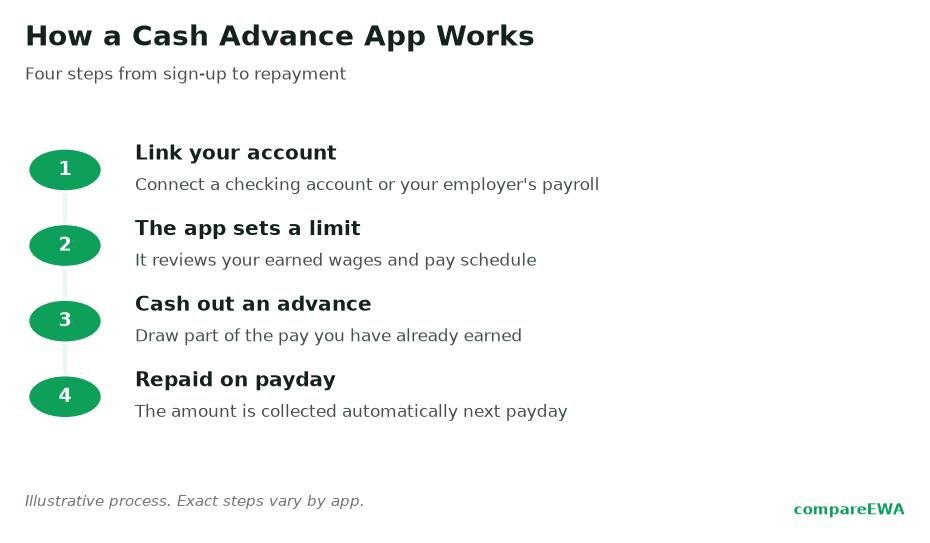
You need $120 before Friday, your paycheck lands next Wednesday, and an app promises to float you the difference in minutes. Before you tap download, it helps to know exactly what happens after you do: what the app connects to, how it decides how much to give you, when the money actually shows up, and how it takes its money back. That is the whole machine, and once you have seen it move once, none of it feels mysterious.
So here is how cash advance apps work, traced from sign-up to the auto-debit on payday, with the parts most reviews skip left in.
Almost every app falls into one of two buckets, and the difference is where it gets its information about your pay.
Account-linked apps connect straight to your checking account and estimate your income from what they see there. Dave, EarnIn, Brigit, Klover, MoneyLion, and Cleo all work this way. They watch your direct deposits land, notice the rhythm, and use that to guess how much you have earned but not yet been paid. You do not need your employer's permission or involvement.
Employer-linked apps (sometimes called earned wage access, or EWA) plug into your workplace's payroll or timekeeping system instead. DailyPay and Rain are the common examples. Because they can read your actual hours worked, they know almost to the dollar how much wage you have accrued this pay period. The catch is your employer has to offer the program in the first place.
Both models sell the same promise, which is early access to money you have already earned. They just verify it differently. The federal Consumer Financial Protection Bureau, in its July 2024 look at the paycheck advance market, estimated that roughly 7.2 million workers used employer-partnered programs and about 3 million used direct-to-consumer apps in 2022. The same report put total advances at around $32 billion for the year, with an average transaction of about $107. So this is not a fringe product. Millions of people run this play every payday.
The first screen after sign-up almost always asks you to connect your bank. Most consumer apps do this through a data aggregator, and the one you will run into most is Plaid. Plaid sits between the app and your bank and brokers a read-only connection, which is the part worth slowing down on.
Read-only means the app can see information but cannot move your money around on its own outside of the advance and its repayment. It can view your transaction history, your current balance, and your incoming deposits. It cannot log in and send your rent to a stranger. In practice, connecting through Plaid also means the app never stores your raw online-banking password: you authenticate with your bank, and the app receives a token, not your credentials.
Here is the honest part, though. Read access is broad. The app can see the coffee, the rent, the payday-loan payment, the gambling site, all of it. It uses that stream to judge whether you are a safe bet for an advance. If seeing that much of your spending bothers you, that is a legitimate reason to prefer an employer-linked app, which reads your hours rather than your grocery runs.
This is the step that surprises the most first-time users, because the number in the ad is almost never the number you get.
An account-linked app scans for a few things: recurring direct deposits (are you actually getting paid, and how often), the size of those deposits, and your spending pattern (does your balance survive to payday or crater on day three). From that, it estimates how much you have "earned but not yet received" and sets a ceiling. Employer-linked apps skip the guesswork and cap you at a slice of the wages you have literally clocked this period.
The advertised maximum is a ceiling, not a starting point. EarnIn is a useful example because it publishes the mechanics. On its Cash Out product, EarnIn describes new users typically accessing around $85 per day, with a Daily Max that can range anywhere from $0 to $150 and a cap of up to $1,000 per pay period once you have built history. A brand-new account does not walk in at $1,000. It earns its way up by showing consistent deposits and repaying on time.
So if you download something today expecting $500 tonight, temper that. First advances of $50 to $100 are the norm across the category, and the limit grows as the app watches you handle it.
Every app gives you two speeds, and this is where the real money hides.
The standard transfer is free. It rides the normal ACH bank rails and usually lands in one to three business days. If you request an advance Monday morning and payday is Friday, standard might beat your bill anyway, for zero cost.
The instant transfer pushes the money to your debit card in minutes, and you pay a fee for it. That fee is small in absolute terms, often a few dollars, but it is the single biggest source of real cost in this whole industry. The CFPB's 2024 analysis found that expedited-delivery fees made up the overwhelming majority of what consumers paid, which tells you where the business actually earns its keep. The advance itself is the loss leader. Speed is the product.
Picture the choice concretely. You need $100. Standard is free but arrives Thursday. Instant costs, say, $4 and arrives in ten minutes. If the money genuinely cannot wait, $4 is a reasonable price. If it can wait two days, that $4 is pure convenience tax. Knowing which situation you are in is most of the skill here.
You do not make a payment. The app makes it for you.
When you take an advance, you authorize the app to auto-debit the amount (plus any instant fee or optional tip) from your linked checking account on a set date, almost always your next payday. The app watches for your deposit to land, then reaches in and pulls what you owe. From your side it is passive: the balance just disappears when your paycheck hits.
Repayment behavior is not identical across apps, and it is worth reading your specific app's terms rather than assuming. Some let you push the repayment date back if you are going to be short. Some will re-attempt a failed debit a day or two later. Some split larger balances. The one constant is that you signed up for an automatic pull, so the money leaves whether or not you remembered it was coming.
Here is the scenario nobody advertises. Payday arrives, the app tries to collect its $100 plus a $4 fee, but your paycheck was smaller than usual or a different bill cleared first. Now the debit hits an account that cannot cover it.
Two things can go wrong. First, if your bank allows the transaction to go through into the negative, you get hit with an overdraft fee, which at many banks runs around $35 and dwarfs anything the advance itself cost. Second, some apps re-attempt the debit, and a second failed pull can mean a second overdraft. The tool you used to avoid a cash crunch can, in the wrong week, deepen one.
This is the risk to respect. A cash advance is not free money that appears; it is money pulled forward from a paycheck that will be exactly that much smaller when it arrives. If borrowing $100 today means next Friday's check is short by $104, and short paychecks are already your problem, you can end up leaning on the app every single cycle. That loop is the real danger, more than any single fee.
Short answer: legally, right now, a qualifying earned wage access advance is generally not treated as a loan.
In December 2025, the CFPB issued an advisory opinion reaffirming that qualifying earned wage access products are not "credit" under the Truth in Lending Act, and that optional expedite fees and tips are not finance charges. That is why you typically see no stated interest rate and no traditional credit check when you use one. An earlier 2024 proposal had floated treating these advances more like loans, complete with an illustrative APR, but that framing was withdrawn, so treat any "these are secretly 100%-plus APR loans" headline as older commentary rather than current law.
Two caveats keep this honest. No APR on the label does not mean no cost, because the instant-transfer fee and any tip are still real dollars leaving your account. And the fact that it is not legally a loan does not change the cash-flow reality: you are still spending future income today. How much these advances truly cost, and how that compares across apps, is its own topic worth working through before you pick one.
Generally no. Most cash advance apps do not run a hard credit check and do not report your advances to the major credit bureaus. Instead of a credit score, they judge you on your bank activity, mainly whether you receive steady direct deposits and keep your account in decent shape.
Usually less than the advertised maximum. First-time limits commonly land between $50 and $100, and they grow as the app sees a track record of consistent deposits and on-time repayment. EarnIn, for instance, describes new users accessing around $85 per day before their limit climbs.
They auto-debit the advance, plus any instant-transfer fee or tip, from your linked checking account on your next payday. You do not send a payment manually. The app pulls it automatically once your paycheck lands.
The auto-debit can hit an account that is short, which may trigger an overdraft fee from your bank (often around $35), and some apps re-attempt the failed pull. A few apps let you reschedule the repayment date if you tell them ahead of time, so check your specific app's options before payday arrives.
If it links through an aggregator like Plaid, yes, it generally has read access to your transaction history and balances so it can gauge your income and spending. It cannot move money out of your account beyond the advance and its scheduled repayment. Employer-linked apps that read your payroll hours see less of your spending.
A free standard transfer typically takes one to three business days over ACH. A paid instant transfer to your debit card usually arrives within minutes. If your bill can wait a couple of days, the free option often gets there in time anyway.
No credit check does not mean no underwriting. See what cash advance apps really read in your bank data, and what a denial means.
Read article
Earned wage access vs payday loans: how they compare on interest, repayment, and the protections that apply to each.
Read article
Are cash advance apps safe? What they can see when you link your bank, the protections you have, and the gaps that remain.
Read articleSee how the top earned wage access apps stack up on fees, limits, and speed. View the full ranking