October 13, 2026
Where Can I Borrow $50 Instantly? Real Options and Costs
Short on $20 to $50 before payday? Compare cash advance apps, no-fee overdraft cushions, and employer EWA on what each actually costs for $50.
Read article


Say you started a new job six weeks ago. You're paid every other Friday, on time, no drama. But your checking account is barely older than the job itself, and half of last month's deposits came from your old employer while you were transitioning.
You open a cash advance with pay stub app, stub in hand, because you figure it proves everything a bank statement would. Then the app tells you it can't verify your income. The algorithm reading your bank feed doesn't like what it sees, and that has nothing to do with whether you're actually getting paid. A few apps solve exactly this problem.
That gap between "I can prove I'm employed" and "the app can verify I'm employed" is the whole problem this article sits inside. A pay stub is direct evidence. A bank-transaction scan is a proxy for that evidence, and proxies fail people whose financial lives don't fit the pattern the scan was built to recognize.
Many apps, including Klover, Brigit, and MoneyLion, don't ask to see your paycheck at all. They ask for read access to your bank account, usually through Plaid, and they look for a pattern: the same amount, from the same source, landing every week or two. When that pattern is clean, approval is fast. When it isn't, the app has nothing else to go on.
A thin account trips this up immediately. So does a mixed one. A driver who just switched from one delivery platform to another has two different deposit names showing up in the same month, and someone who moved states and opened a new bank has months of nothing behind them.
A worker sharing an account with a partner sees deposits and withdrawals that don't sort cleanly into "income" and "spending." The deposit history looks messy to a system that was built to reward tidiness, even when the person is getting paid reliably.
This is a separate problem from not having direct deposit at all, which is its own hurdle covered in apps that skip direct deposit entirely. Here, the worker has deposits. They're just not old enough, consistent enough, or singular enough for a bank-read algorithm to trust.
A pay stub sidesteps that entirely, because it comes straight from the employer's payroll system rather than from inferring income out of a checking account's noise. It doesn't matter how the bank feed looks if the document proving employment and pay comes from the employer directly. That's the entire reason this verification path exists: it answers the question a bank scan is only guessing at.
Among the providers covered in this article, only a handful actually verify income without leaning on a bank-transaction read. They fall into three distinct categories, and they are not interchangeable.
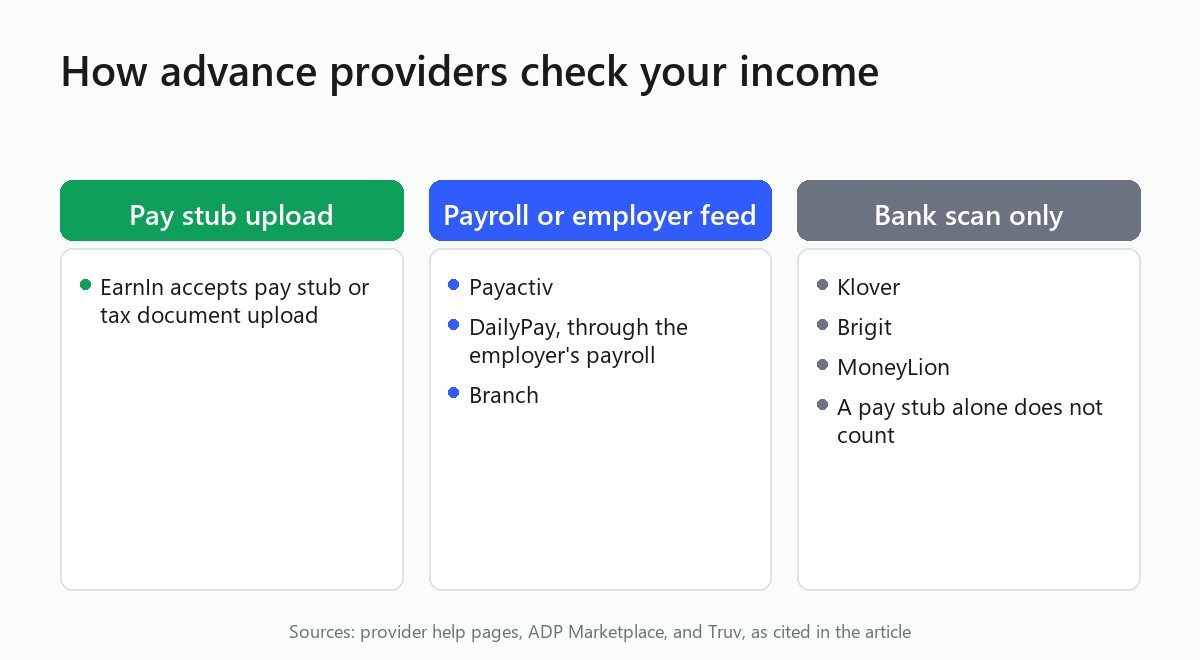
EarnIn is the clearest example of an app that treats a pay stub as a legitimate stand-in for bank history. According to employment-verification vendor Truv, EarnIn has offered a manual pay stub or tax-document upload as an alternative to bank-transaction verification. A worker with a thin or messy bank history isn't stuck. They can send a recent pay stub through the app, or work it out during a chat with support, and EarnIn uses that document to confirm employment and income rather than requiring a spotless deposit trail.
That upload path is the direct answer for a worker in this spot: no employer sign-up, no bank read, just a document that shows what you're earning. The next section covers apps that verify income a different way entirely, through the employer's own payroll system instead of anything the worker submits.
The second path doesn't run through the worker signing up on their own at all. Payactiv, DailyPay, and Branch operate through the employer. The employer contracts with the provider, enrolls its payroll system, and the worker gets access as a benefit tied to that job, not as a consumer choice made independently. This is the same category covered in depth in how employer-linked payroll advances work, which walks through the fee and factoring mechanics; here, the focus is narrower: how verification itself happens.
Because the app is plugged directly into the employer's payroll system, it isn't scanning a bank account to guess at income. It's reading what payroll already reports: hours logged, wage rate, wages earned but not yet paid out. Payactiv's sign-up process reflects this employer-anchored structure: registration happens under the employer's account, not the worker's own.
DailyPay follows a comparable model; its ADP Marketplace listing confirms it integrates through an employer's ADP or Wisely payroll platform rather than through an individual sign-up. Branch sits in the same employer-enrollment category.
A paycheck cash advance app that works this way has a real limitation: if your employer hasn't signed up, you can't sign yourself up. But it also means verification is close to automatic once your employer is on board. There's no bank scan to fail, because there's no bank scan involved.
These are the apps that get lumped into "pay stub friendly" searches but don't actually offer that path. A worker who assumes otherwise wastes time on an application that was never going to clear.
Klover markets a broad eligibility bar, but its verification runs entirely through bank-linked direct deposit history via Plaid. It does not offer a pay stub upload option.
Brigit works the same way. It verifies income through recurring deposits in a linked bank account, commonly via Plaid, and a pay stub isn't a substitute if that bank read comes back inconclusive. Brigit's own help center is direct about what causes a failed verification: inconsistent depositor names, transfers instead of payroll deposits, cash deposits, and paper checks all fail the check. If your deposits look irregular for reasons that have nothing to do with whether you're actually employed, Brigit's model has no separate lane for you.
MoneyLion's Instacash also relies on linked bank deposit history, tied to a RoarMoney account or a linked external checking account with a pattern of recurring direct deposits, rather than a pay stub option.
A short side-by-side of the providers that verify income without a bank-transaction scan, and what each one asks you to hand over procedurally:
Notice the pattern: the two categories that skip bank scanning entirely, pay stub upload and payroll data feed, either put the worker in the driver's seat (EarnIn) or put the employer in the driver's seat (Payactiv, DailyPay, Branch). None of these three, Payactiv, DailyPay, or Branch, let a worker sign up cold and get employer-feed verification without the employer's participation.
Handing an app your bank login is already a decision most people don't love making. Handing over payroll or HR portal credentials is a different kind of decision.
The infrastructure behind some "connect your payroll account" verification flows works by asking a worker for the same login they'd use to check their own pay stub on their employer's HR portal, a different credential entirely from a bank password. Security researchers covering this space have flagged that this credential flow can expose more than an income figure. It can surface job title, start date, full compensation and deduction detail, and direct deposit destination, and in a scenario where those credentials are compromised, it opens a path into HR and payroll systems that goes well beyond what a simple income check needs, according to a security research critique of payroll-credential aggregators.
That's a critique from a security research outlet, not a regulatory finding, and it isn't evidence that any specific consumer-facing app is mishandling data. It's a reason to know what you're authorizing before you authorize it.
A bank login tied to a checking account only shows what moved in and out of that one account. A payroll credential can expose far more of your employment record than an income check needs. None of this means the pay-stub or payroll path is the wrong choice for a worker whose bank history genuinely can't clear a Plaid-style scan.
It means the trade-off is worth naming out loud instead of treating it as a footnote. A bank login and a payroll login are both a form of trust extended to a third party, but they're not scoped the same way, and a worker deciding between the two options this article covers should weigh that difference before clicking through a sign-up flow.
Pinwheel, one payroll connectivity vendor, acknowledges the stakes on this directly. Pinwheel's own data-security framing treats strong security as a baseline requirement precisely because payroll data carries this kind of sensitivity. That's the industry's own side of the argument for why this connection type needs careful handling, a useful companion read before you decide how to vet an app before linking any account.
Where does regulation sit on all this? Data-sharing rules for third parties are still being contested, so don't treat any current legal framework as a settled backstop for how your data gets used once you authorize access. A bank login generally offers read-only access scoped to transaction history, while a payroll credential can expose a wider slice of your employment record. Both require trust in the provider on the other end; they're not equivalent trades.
A bank history that's thin, mixed, or new isn't a dead end when you have a pay stub in hand. EarnIn's upload path is the most direct answer to the search that brought you here. It doesn't require your employer to do anything, and it doesn't ask for payroll credentials at all when you go the manual-upload route.
Already have Payactiv, DailyPay, or Branch through your employer? That path sidesteps bank verification completely, because the app isn't reading your bank account in the first place. Check with HR or payroll before assuming an app in this category will work for you, since none of them can be activated without employer enrollment. A worker whose employer has no contract with Payactiv, DailyPay, or Branch can't use those apps at all, no matter how clean their pay stub looks.
Got a clean, consistent deposit history in an established account? A paycheck cash advance app like Klover, Brigit, or MoneyLion remains a workable option. Just go in knowing that's the model they run on, and that a pay stub won't move the needle if the bank read comes back inconclusive. Whichever path fits, it helps to compare apps side by side on more than just the verification method before you commit to one.
It's a cash advance or earned wage access app that can confirm your income using a pay stub, a payroll-system connection, or an employer data feed, rather than requiring a bank-transaction history to establish that you're getting paid regularly.
EarnIn accepts a pay stub sent through the app or during a support chat as an alternative to bank-transaction scanning, and it uses that document to confirm employment and income. Klover, Brigit, and MoneyLion do not offer a pay stub upload path; all three verify income through linked bank-transaction history.
No. All three operate as an employer-enrolled benefit. The employer has to contract the service and enroll its payroll system before a worker can register, so a call to HR or payroll is the fastest way to find out whether the option exists at your job, before you spend time on a sign-up screen that will never load.
The two carry different risk levels. A bank login generally offers read-only access scoped to transaction history. A payroll credential can expose a broader record, including job title and pay detail, which researchers have flagged as a wider exposure surface if compromised.
Apps like Klover, Brigit, and MoneyLion verify income by scanning bank-transaction history, not by reading a pay stub directly. A new account, mixed deposit sources, or a shared account can get flagged even when a pay stub would settle the question immediately.

Short on $20 to $50 before payday? Compare cash advance apps, no-fee overdraft cushions, and employer EWA on what each actually costs for $50.
Read article
Venmo doesn't lend money or offer cash advances. Here's what it actually offers, what cash advance apps really do, and how to ask a friend safely.
Read article
Cash App Borrow lets you take $20 to about $500 for a flat fee with a real APR equivalent. See how to unlock it and how it compares to an EWA advance
Read articleSee how the top earned wage access apps stack up on fees, limits, and speed. View the full ranking