October 19, 2026
Cash Advance With Pay Stub App: No Bank History Needed
Thin or messy bank history? See which cash advance apps verify income from a pay stub or payroll link, and what each one asks you to hand over.
Read article


Say you have $22 in checking two days before payday. Gas money to get to your shifts, plus a small fee your kid's school wants by Friday, adds up to more than that $22 covers. You do not need a loan. You need about $30, fast, without handing over a chunk of it in fees for the privilege.
If you are asking where you can borrow $50 instantly, here is the direct answer: a bank's fee-free overdraft cushion, a low-minimum cash advance app, employer-sponsored earned wage access through your paycheck, or simply asking whoever you owe for a few extra days. Those four paths cover almost every version of this problem, and which one costs you nothing versus which one costs you real money depends entirely on your specific setup, not on which app has the flashiest ad. Two of the four can cost you nothing at all once you qualify; the rest come with a real, calculable price.
The part nobody spells out clearly is what these options cost once you actually run the math on a small amount. A flat fee that looks minor on a $200 advance turns into a real bite on $50, and it gets worse the smaller your request gets. Below is what that math actually looks like, option by option.
App minimums vary and can change, so check the app for its current minimum before you count on it. EarnIn does not publish a fixed minimum advance amount; instead, the app starts new users with a smaller available limit that grows as they build a history of linked paychecks, so there is no clean number to point to there either.
This is where a bank-based overdraft cushion tends to fit better than an app built around bigger advances, because a cushion can be sized to cover exactly $20 without forcing you into a minimum you did not ask for. We will get into how that works in the next section.
It is worth understanding the mechanics behind any of these apps before you link one to your bank account, since the process (connecting your account, requesting the advance, getting repaid automatically on your next deposit) works a little differently depending on the provider. Our guide on how cash advance apps work breaks down that full cycle if you have not used one before.
Thirty dollars sits closer to where cash advance apps are actually built to operate, even though most of their marketing centers on much larger amounts. The advance itself is not the problem. The problem is what you pay to get it instantly.
Brigit and EarnIn both charge for instant transfers; check the fee screen inside the app before you request the transfer, since a starting figure quoted in an ad is not always what you will see at checkout.
There is a bigger pattern worth knowing before you download anything: the amount an app advertises and the amount a small-dollar user actually receives are often two different numbers. The FTC's November 2023 consumer alert said Brigit advertised advances "up to $250," but only about one percent of customers ever got that $250 figure, with most receiving far smaller first advances instead.
Brigit's Plus membership cost $9.99 a month at the time, and the company paid an $18 million refund settlement tied to that gap between the ad and the reality. If you are chasing a $30 advance, you are the typical user, not the outlier in the ad, and a $9.99 monthly membership stacked on top of a $30 advance is a rough ratio no matter how you slice it.
For a broader breakdown of what these apps charge across subscription tiers, tips, and instant-transfer fees, our piece on earned wage access fees explained covers the full mechanics beyond what fits into this $20 to $50 scope. And if a subscription fee is the thing giving you pause, there is also a roundup of cash advance apps with no monthly fee worth checking before you commit to one that bills you every month whether you borrow or not.
This is the option that the top-ranking $50 app roundups skip entirely, and it is often the cheapest one on this list. Chime's SpotMe feature gives eligible members fee-free overdraft coverage starting at $20, with the limit able to grow to a base maximum of $200 over time based on account history. To qualify, you need at least one direct deposit of $200 or more within the past 34 days.
Chime states plainly that there is no fee for this coverage, though normal ATM or merchant fees from other places can still apply on top of it. Source: Chime Help Center, "What is SpotMe?"
Run that $30 gap through SpotMe and the math is simple: if you are an eligible Chime member with a qualifying direct deposit on file, your card just goes through for the extra $30 at checkout or the ATM, no request to submit, no instant-transfer fee to weigh. That $20 starting limit already covers the lower end of a typical "borrow 20 dollars instantly" search, and the $200 base maximum comfortably covers a $50 request once your account has built some history.
Chime is not the only bank offering something like this. PNC's Low Cash Mode works a bit differently: it gives a 24-hour grace window to bring a negative balance back to zero before a $36 overdraft fee kicks in, and it separately waives that fee entirely if the account ends the day overdrawn by $5 or less. That is a time-based cushion rather than a dollar-limit one, so it is a weaker fit for someone who needs $30 sitting available right now, but it is worth knowing about if your bank offers something similar and Chime is not an option for you. Source: PNC Low Cash Mode
If your employer offers earned wage access through a payroll partner like Payactiv, this is worth checking before any app, because the fee structure at this exact dollar size tends to favor it heavily. Payactiv charges $1.99 per transaction for an expedited transfer to a debit card or for cash pickup at Walmart. That fee is waived entirely for employees who receive a qualifying direct deposit of $200 or more per pay period onto the Payactiv Visa Card, which means many employer-EWA users pay nothing at all for the same-size advance. Source: CFPB Payactiv Approval Order, December 2020
The distinction that matters here: employer EWA draws against wages you have already earned on your current pay period, and it is built into your paycheck system rather than a separate financial product you sign up for on your own. If your job offers this and you have never used it, ask HR or check your payroll app before you reach for a third-party app. For a full side-by-side of how employer-provided EWA differs from the apps you download yourself, see our comparison of employer earned wage access versus cash advance apps.
This one costs nothing. If the $30 you are short is for a bill, not for gas or groceries, call the biller before the due date and ask for a few extra days. It will not solve a cash shortage that hits you at the register, but for a due-date problem specifically, it is the cheapest option on this entire list.
Here is where the size of the request changes everything. A fee that reads as trivial on a $200 advance stops being trivial once you shrink the advance down to $50. Below is what three verified options cost, plus one illustrative flat fee, as a share of a $50 advance:
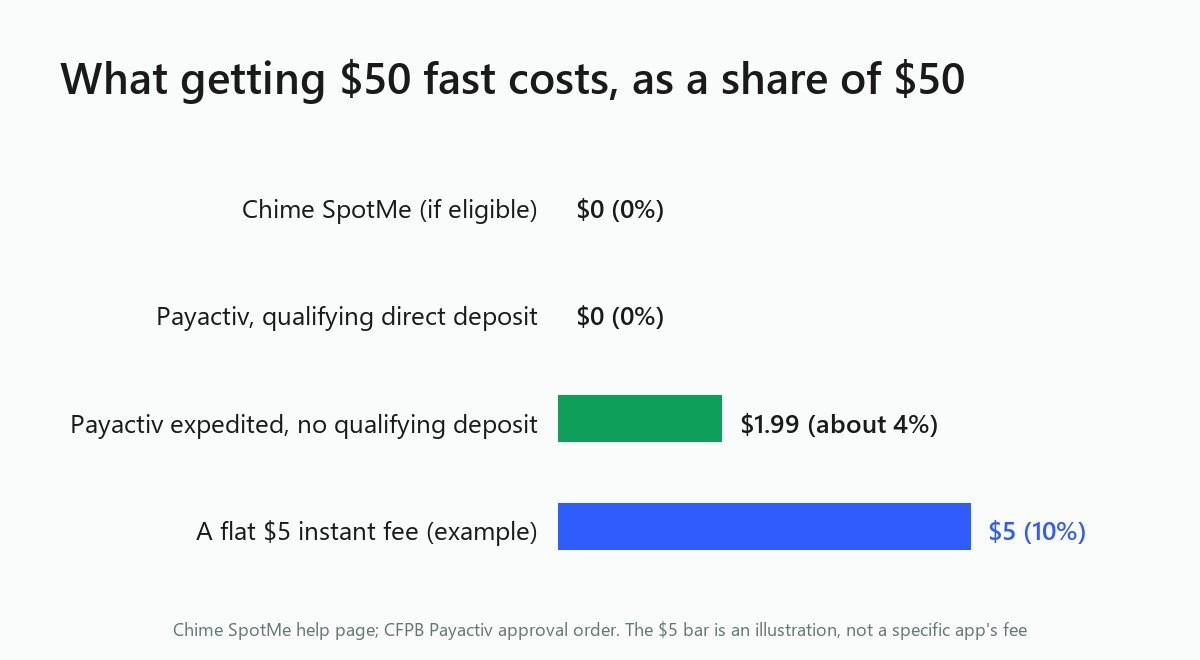
That last row is an illustrative framing figure, not any single company's real posted fee. It shows what a flat, moderate instant-transfer charge does to the math once the advance itself shrinks to $50. A $5 fee barely registers as 2.5% on a $200 advance, but on $50, that identical $5 becomes 10%.
Shrink the advance further to $30 or $20 and that same flat fee climbs past 15% and 20% respectively. A paid instant fee, whatever the app charges, is a real cost against a $0 option.
This is the math that most $100-focused app roundups never show, because their examples are built around advances large enough that a flat fee looks small by comparison. At $50 and under, the fee is doing most of the talking, and a $0 option like SpotMe or a fee-waived Payactiv transfer wins outright, every time, against any paid instant transfer.
What the numbers above make plain: at $50 and below, a paid app is rarely your best move if you have any free alternative available. A $5 instant-transfer fee on a $50 advance is a tenth of the money you are borrowing, gone before you even spend it. That is far more than a rounding error. Compare that to a fee-free SpotMe cushion or a waived Payactiv transaction, and the paid app has to justify a real cost against a free one that does the exact same job.
That does not mean apps like Dave, Brigit, or EarnIn are a bad choice categorically. They fill a real gap for people without access to a qualifying bank cushion or an employer EWA benefit. The point is narrower: before you pay a fee to borrow $50 instantly, check whether your bank or your employer already gives you a free way to do the same thing. The free options rarely advertise themselves the way an app with a marketing budget does.
If your gap is bigger than $50, the math shifts, since the same flat fees that hurt badly on small amounts start shrinking as a percentage once the advance gets larger. Our breakdown of the best $100 cash advance apps covers that larger-dollar case in full, including how the same providers compare once you are not squeezed by a tiny advance size.
Check whether your bank offers a no-fee overdraft cushion like Chime SpotMe, which covers eligible members starting at $20 with no fee for the coverage itself, or check whether your employer offers earned wage access through a payroll partner like Payactiv, where the $1.99 transaction fee is waived entirely for employees with a qualifying direct deposit of $200 or more per pay period.
App minimums vary and can change, so check the app for its current minimum. EarnIn does not publish a fixed floor at all, starting new users with a smaller limit that grows over time. A bank overdraft cushion sized to your account, like Chime SpotMe's $20 starting limit, is often a better fit for a request this small.
It depends on the app's instant-transfer fee at that amount. EarnIn and Brigit both charge for instant transfers, so confirm the exact cost on the fee screen inside the app before you request the transfer.
Often, yes, at least at small dollar amounts. Payactiv's $1.99 transaction fee for an expedited transfer is waived entirely for employees with a qualifying direct deposit. Employer EWA also draws only against wages you have already earned in the current pay period, rather than functioning as a separate app-based product you sign up for independently.
The math changes once the advance gets larger, since the same flat instant-transfer fees shrink as a percentage of a bigger amount. See our guide to the best $100 cash advance apps for that comparison, or our broader roundup of fast-cash options if your situation does not fit neatly into either the small or the larger advance category.
Treat advertised maximums with some skepticism. The FTC's November 2023 consumer alert said Brigit advertised advances "up to $250," yet only about one percent of customers ever received that amount, with most getting far smaller first advances instead. What a new or small-dollar user actually receives is often well below the headline figure in the ad.

Thin or messy bank history? See which cash advance apps verify income from a pay stub or payroll link, and what each one asks you to hand over.
Read article
Venmo doesn't lend money or offer cash advances. Here's what it actually offers, what cash advance apps really do, and how to ask a friend safely.
Read article
Cash App Borrow lets you take $20 to about $500 for a flat fee with a real APR equivalent. See how to unlock it and how it compares to an EWA advance
Read articleSee how the top earned wage access apps stack up on fees, limits, and speed. View the full ranking